Service Workers: The Hidden Browser Install Websites Leave Behind (2026)
Service workers speed up web apps — but they persist in your browser after you leave a site. Learn what they store, why they affect your privacy, and how to remove them.
You've probably used apps that work offline or load almost instantly even on a slow connection. Service workers are what make that possible. They're also one of the more persistent things a website can install in your browser, and understanding them is worth your time if you care about what's running in the background.
The Simple Explanation
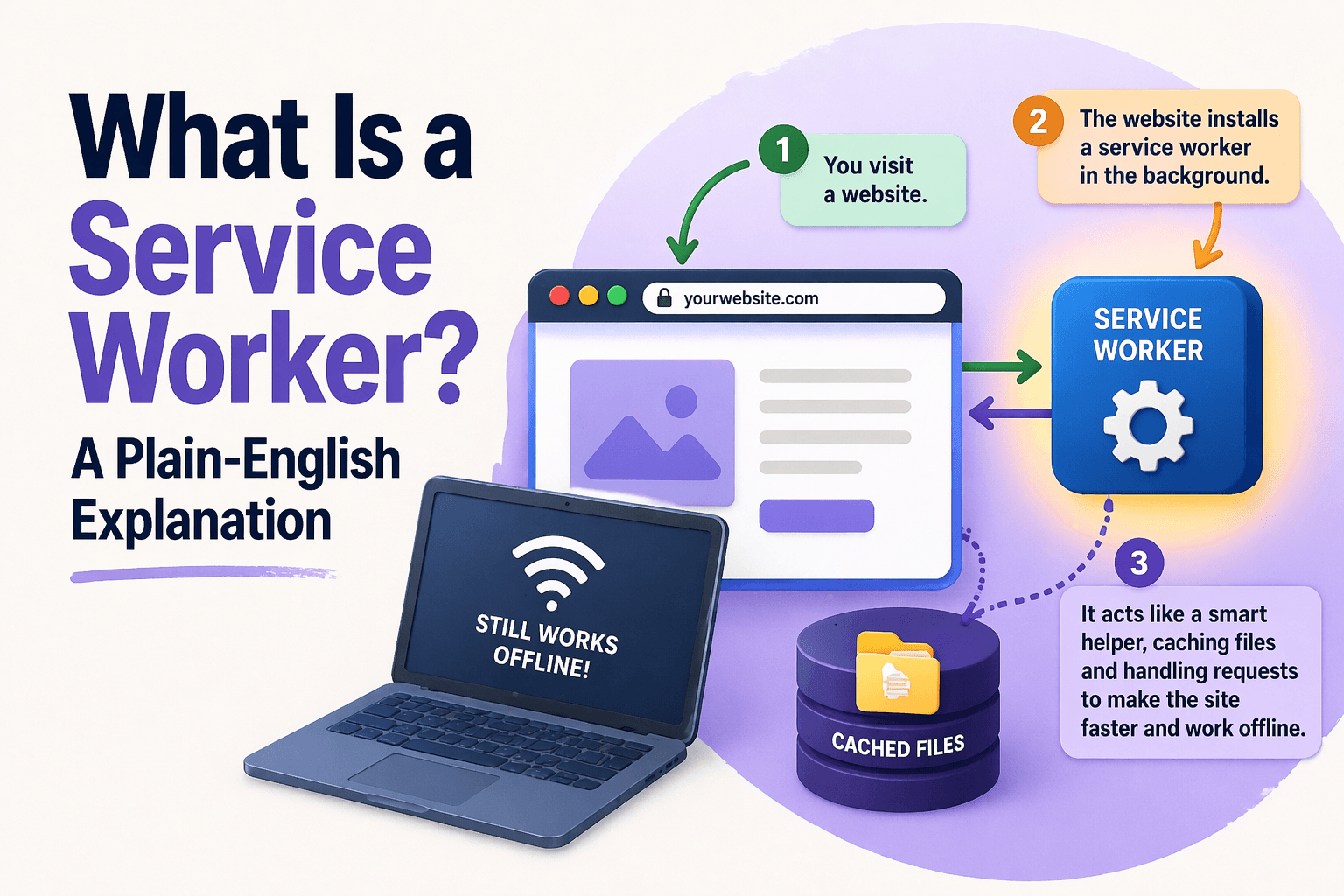
A service worker is a script that your browser installs on behalf of a website. Unlike regular scripts that run when you load a page, a service worker sits in the background between your browser and the network. It can intercept requests, serve cached content, and run even when you've closed the tab.
Think of it as a small programmable assistant that the website has installed in your browser.
What Service Workers Are Designed To Do
The intended use cases are genuinely useful:
Offline functionality. A service worker can cache a website's core files so that if you lose internet access, the site still loads and displays its last known content.
Faster load times. By serving cached assets directly from the browser rather than waiting for network responses, service workers can make pages load significantly faster.
Background sync. If you fill in a form or make a change while offline, a service worker can queue that action and sync it when you reconnect.
Push notifications. Service workers enable websites to send you notifications even when you're not actively using them, similar to native apps.
These are the reasons they were created. However, their persistent nature creates some privacy considerations worth knowing about.
The Privacy Side of Service Workers
Service workers persist after you leave the site. A service worker installed by a website continues to run in the background. It can wake up to handle push notification events or other triggers even when you're not visiting the site.
They can cache third-party resources. A service worker has control over what gets cached, including scripts from third-party analytics or advertising providers. Those cached scripts persist in your browser.
Clearing cookies doesn't remove them. Service workers are stored separately from cookies. If you clear your cookies, any installed service workers remain in place. This is one of several reasons why clearing cookies alone isn't enough to protect your browser privacy.
They can be used to store identifiers. A service worker can store state information that persists across sessions, similar to local storage but with more capabilities.
How to Check What Service Workers Are Installed
In Chrome or Edge, you can navigate to chrome://inspect/#service-workers or edge://inspect/#service-workers to see all active service workers.
Alternatively, open DevTools (F12), go to the Application tab, and look in the Service Workers section in the left panel. You'll see a list of all installed service workers along with their status.
This is more information than most people ever look at, but if you want to know what's running in your browser, that's where to find it.
How to Remove a Service Worker
Removing a service worker manually requires going to DevTools and clicking Unregister next to each one. It's not a streamlined process for most users.
Permission Trail detects and surfaces service workers installed by websites in its dashboard, so you can see them alongside other stored data and remove them when you choose to.
Should You Be Concerned?
For most legitimate websites, service workers are doing what they're supposed to: making the site faster and more reliable. The concern is more about the data they cache and the scripts they store persistently.
The main practical point is that clearing your cookies and browsing cache is not the same as removing everything a website has left behind. Service workers are a separate category, and they're one of the less visible ones. Along with cookies and local storage, they form part of the broader picture of how websites track you beyond what you can see.
A Note on Progressive Web Apps
If you've ever installed a website as an app on your phone or desktop, you've installed a progressive web app (PWA). Service workers are what power PWAs. They're not inherently problematic, but it's worth knowing that installing a PWA gives that site more persistent access to your device than a regular browser tab would.
See exactly what's stored in your browser right now
Permission Trail reveals every cookie, IndexedDB entry, service worker and cache file websites have stored on your device — and lets you delete it all in one click.